# How to Buy / Redeem NAKA Punks NFT

## How to Buy NAKA Punks NFT on Mainnet

NAKA Punks is available for purchase & mint on the [What is NAKA Marketplace](/naka-marketplace/what-is-naka-marketplace.md) under the **Naka Punk** section.&#x20;

Before starting, make sure that you have a Nakamoto Games account first (for first timer, please go through [Broken mention](broken://pages/PxKcIpEQXNuwo8Z4IALe) before proceeding) and connect your wallet while in the NAKA Marketplace platform.

<figure><img src="/files/eOWHsfrEmbwpIV3ce813" alt=""><figcaption><p>NAKA Punks Minting Interface</p></figcaption></figure>

To mint NAKA Punks, you will be required to pay **$200 worth of $NAKA** as minting fee, where the amount of $NAKA required will fluctuate depending on $NAKA price at the time of minting.&#x20;

Once you're logged in, click on the **Allowance** button first to allow your Web3 wallet to interact with the NAKA Punks minting contract.

<figure><img src="/files/HQsA5vTgZK2DAHr7PgN9" alt=""><figcaption><p>Click the Allowance button to allow contract to interact with Web3 wallet</p></figcaption></figure>

After the contract allowance is completed, click the **Random** button to start the minting process. Make sure that you have sufficient amount of $NAKA in your Web3 wallet for minting.

<figure><img src="/files/PecR6uTpjOkZsyzrb148" alt=""><figcaption><p>Click Random to start minting</p></figcaption></figure>

{% hint style="info" %}
Minting process takes approximately 2-3 minutes for it to process using [Chainlink's VRF](https://chainlinktoday.com/nakamoto-games-raises-the-bar-on-transparency-with-chainlink-vrf-integration/) to ensure total randomness in the minting process
{% endhint %}

Once your minting is completed, you'll be greeted with your new NAKA Punk NFT!

<figure><img src="/files/DwmI6UKfWCtc1ByO6u9V" alt=""><figcaption><p>Say Hello to your new NAKA Punk NFT!</p></figcaption></figure>

Your NAKA Punk NFT should be minted to your Web3 wallet that is connected to the Nakamoto Games account and can now be used as your in-game profile picture.&#x20;

You can choose to random & mint a NAKA Punk NFT right away or view your inventory to see your NAKA Punks.

<figure><img src="/files/hj3e0r7vYp7sggJWFlhi" alt=""><figcaption><p>NAKA Punk in your Inventory</p></figcaption></figure>

## How to Redeem NAKA Punks NFT on Mainnet

{% hint style="info" %}
This section is for NAKA Punks pre-sale buyers
{% endhint %}

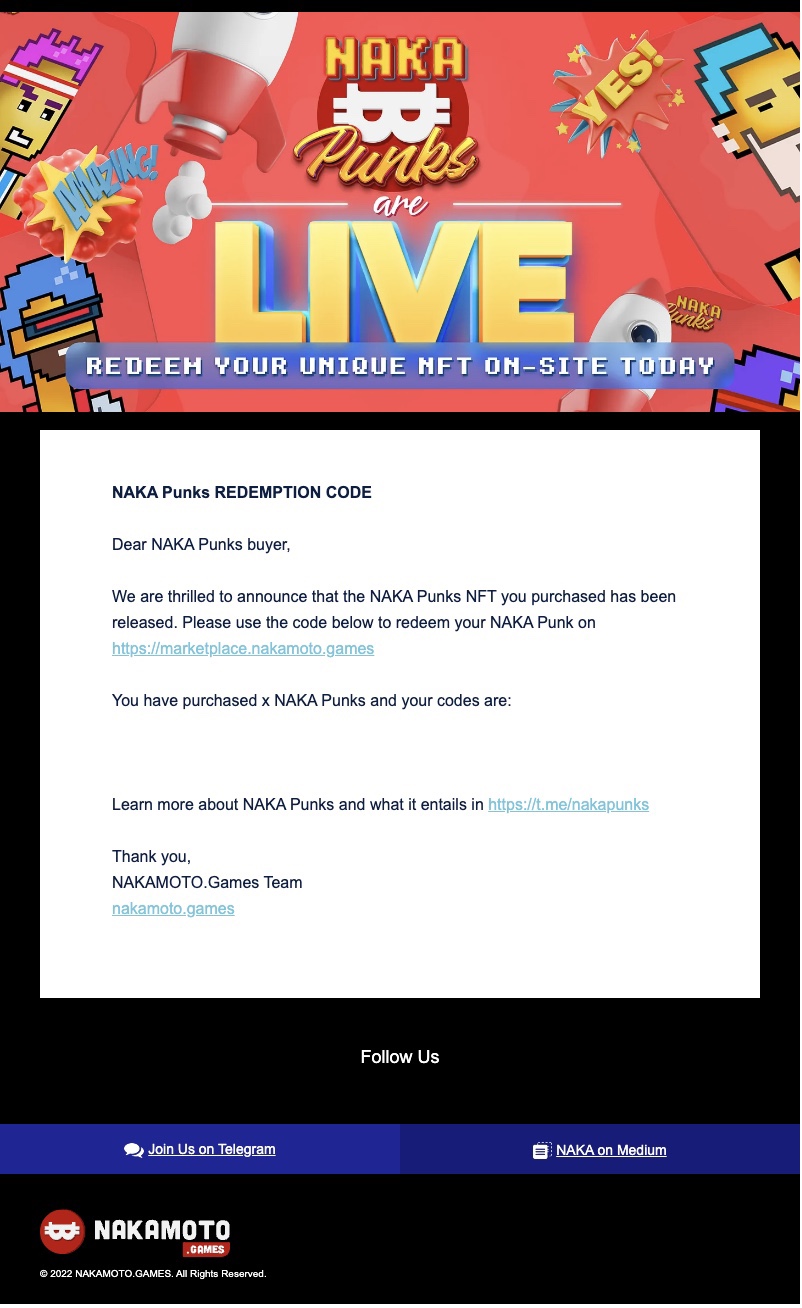
You will receive an e-mail notification from Nakamoto Games detailing the redemption code as the following example:

<figure><img src="/files/fGKSTLEMR0IhuLtiQOFT" alt=""><figcaption></figcaption></figure>

To use your redemption code, go to the [What is NAKA Marketplace](/naka-marketplace/what-is-naka-marketplace.md) and head over to the **Naka Punk** section.

Before starting, make sure that you have a Nakamoto Games account first (for first timer, please go through [Broken mention](broken://pages/PxKcIpEQXNuwo8Z4IALe) before proceeding) and connect your wallet while in the NAKA Marketplace platform.

<figure><img src="/files/eOWHsfrEmbwpIV3ce813" alt=""><figcaption><p>NAKA Punks Minting Interface</p></figcaption></figure>

Once you're logged in, click on the **Allowance** button first to allow your Web3 wallet to interact with the NAKA Punks minting contract.

<figure><img src="/files/HQsA5vTgZK2DAHr7PgN9" alt=""><figcaption><p>Click the Allowance button to allow contract to interact with Web3 wallet</p></figcaption></figure>

After the contract allowance is completed, copy your redemption code and paste your redemption to the toolbar and press **Redeem and Random** button to start the minting process.

<figure><img src="/files/dhWIzYY5o5kKdE3xbWDc" alt=""><figcaption><p>Press Redeem and Random after input the codes in</p></figcaption></figure>

{% hint style="info" %}
Minting process takes approximately 2-3 minutes for it to process using [Chainlink's VRF](https://chainlinktoday.com/nakamoto-games-raises-the-bar-on-transparency-with-chainlink-vrf-integration/) to ensure total randomness in the minting process
{% endhint %}

Once your minting is completed, you'll be greeted with your new NAKA Punk NFT!

<figure><img src="/files/DwmI6UKfWCtc1ByO6u9V" alt=""><figcaption><p>Say Hello to your new NAKA Punk NFT!</p></figcaption></figure>

Your NAKA Punk NFT should be minted to your Web3 wallet that is connected to the Nakamoto Games account and can now be used as your in-game profile picture.&#x20;

You can choose to random & mint a NAKA Punk NFT right away using your second redemption code or view your inventory to see your NAKA Punks.

<figure><img src="/files/hj3e0r7vYp7sggJWFlhi" alt=""><figcaption><p>NAKA Punk in your Inventory</p></figcaption></figure>


---

# Agent Instructions: Querying This Documentation

If you need additional information that is not directly available in this page, you can query the documentation dynamically by asking a question.

Perform an HTTP GET request on the current page URL with the `ask` query parameter:

```
GET https://docs.nakamoto.games/naka-punks/how-to-buy-redeem-naka-punks-nft.md?ask=<question>
```

The question should be specific, self-contained, and written in natural language.
The response will contain a direct answer to the question and relevant excerpts and sources from the documentation.

Use this mechanism when the answer is not explicitly present in the current page, you need clarification or additional context, or you want to retrieve related documentation sections.